
FAQ
- 1. What makes the Birdfy Feeder Cedar D a great choice?
- 2. How do I watch birds on my phone?
- 3. How do I pair the Birdfy Feeder Cedar D with the Birdfy app?
- 4. Does the Birdfy Feeder Cedar D require Wi-Fi or network cables?
- 5. Can the Birdfy Feeder Cedar D be used in rainy or snowy weather or in Canada?
- 6. Where are my bird videos and photos saved?
1. What makes the Birdfy Feeder Cedar D a great choice?
The Birdfy Feeder Cedar D is a beautifully crafted, versatile smart bird feeder—ideal for birdwatching enthusiasts who appreciate both function and natural aesthetics. Designed with suet ball feeding capability, it’s perfect for attracting a wider variety of birds to your backyard.
Crafted from natural western red cedar (Thuja plicata), this lightweight feeder is easy to install and seamlessly blends into your backyard environment. Its spacious seed bin ensures your feathered visitors stay well-fed and happy, and the built-in solar panel keeps the camera running with green energy.
Equipped with a smart camera, the Birdfy Feeder Cedar D offers:
- Standard recording at 1080P/30fps
- High frame rate mode at 1280×960/60fps
Capture sharp, detailed videos or create stunning slow-motion clips directly in the Birdfy app—anytime, with just a tap!
2. How do I watch birds on my phone?
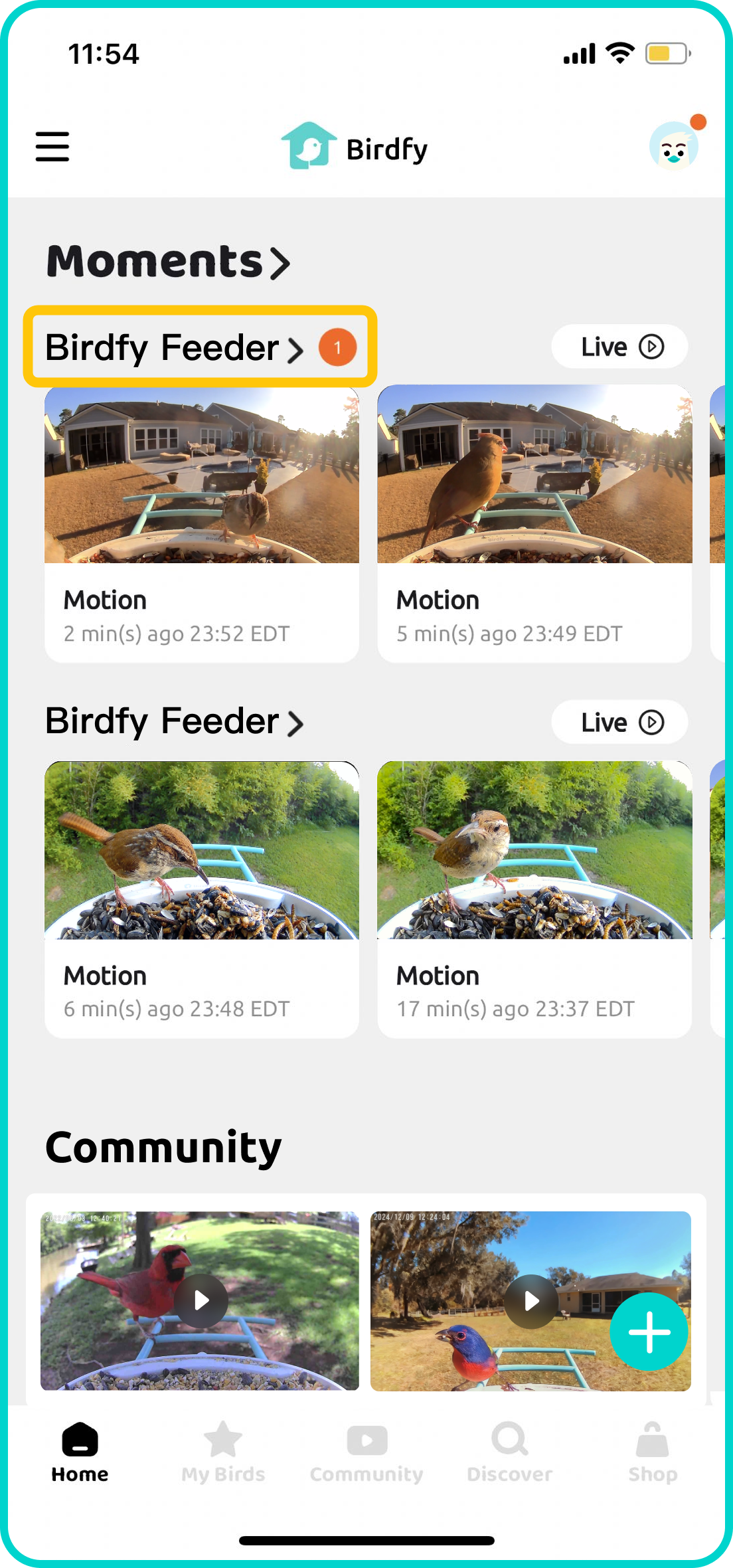
Once your Birdfy device is paired, simply wait for the first bird to visit! All detected activity will be shown in the Moment section on the Birdfy app's home screen.
To view a list of all the recorded content, tap the name of your Birdfy device. If AI Bird Recognition is activated and a bird is successfully identified, a bird name tag will appear underneath the corresponding video.
3. How do I pair the Birdfy Feeder Cedar D with the Birdfy app?
Ensure your device is fully charged before starting the pairing process. Download the latest version of the Birdfy app from the App Store or Google Play. After downloading, create an account, select 'Add Device' on the home page, choose the product you purchased, and follow the in-app instructions to pair your device. *Please make sure you are using a 2.4GHz Wi-Fi network.
4. Does the Birdfy Feeder Cedar D require Wi-Fi or network cables?
It connects via Wi-Fi, specifically on the 2.4GHz frequency. Why 2.4GHz? Compared to 5GHz, it offers a wider range and stronger signal through walls, making it ideal for outdoor use. This frequency is a common standard for most security cameras and smart devices, ensuring a stable and reliable connection.
5. Can the Birdfy Feeder Cedar D be used in rainy or snowy weather or in Canada?
The Birdfy Feeder Cedar D operates within a temperature range of 14°F to 113°F (-10°C to 45°C). If the temperature falls outside this range, the camera may not power on or record motion-triggered videos. With an IP66 waterproof rating, the Birdfy Feeder Cedar D is built to withstand rain and snow, ensuring reliable performance in various weather conditions.
6. Where are my bird videos and photos saved?
Your bird videos and photos are stored in the cloud, so no need to worry about using up your local storage (phew!). The Birdfy Feeder Cedar D comes with unlimited cloud storage, with a 30-day retention period. You can easily upgrade your storage plan by subscribing to our cloud service at my.birdfy.com.