

FAQ
- 1. Why choose Jolly O for your first bird bath?
- 2. How do I watch birds on my phone?
- 3. How is the birdbath mounted?
- 4. Will water splashing on the lens and affect the quality of the image?
- 5. Can the Birdfy Birdbath Jolly O be used in rainy or snowy weather?
- 6. How to pair the Birdfy Birdbath Jolly O camera with the Birdfy app?
- 7. Does the Birdfy Birdbath Jolly O camera require Wi-Fi or network cables?
- 8. How do I insert a microSD card into the camera of Birdfy Birdbath Jolly O? How do I remove it?
1. Why choose Jolly O for your first bird bath?
Birdfy Birdbath Jolly O is an ideal choice for anyone getting their first smart bird bath. Its 1080P wide-angle camera captures all the action in the bathing area, and with 60 fps recording you can enjoy smooth slow‑motion replays of every splash and wing flap. The built‑in solar panel keeps the camera powered throughout the day, while the modular design makes it easy to assemble, disassemble, and maintain.
A tiered basin and a comfortable perch give birds more space to land, drink, and bathe, and they also create a natural "stage" that looks great on camera. With AI bird recognition that can identify local species in your area, Jolly O helps you learn more about your backyard visitors while you simply sit back and enjoy the view.
2. How do I watch birds on my phone?
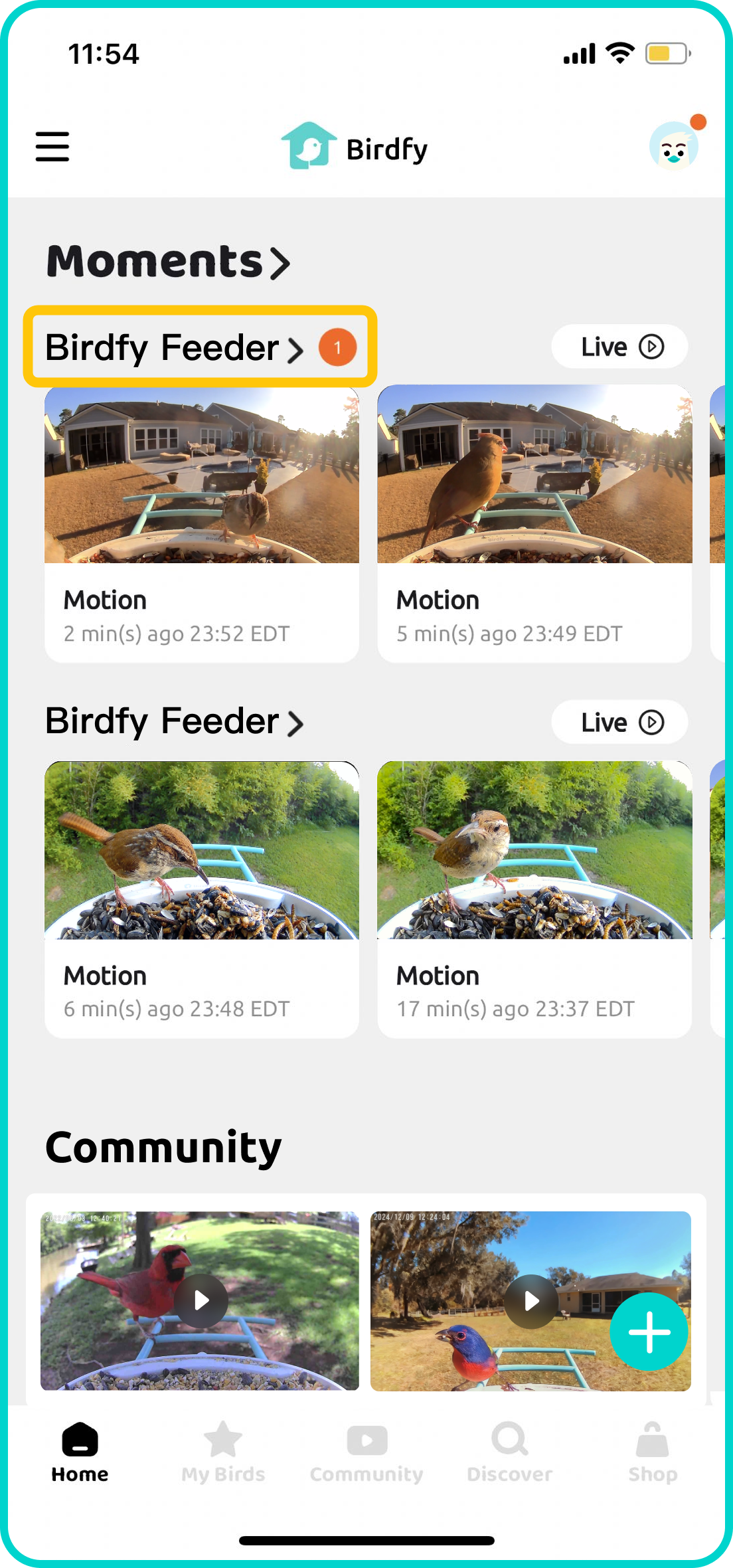
Once your Birdfy device is paired, simply wait for the first bird to visit! All detected activity will be shown in the Moment section on the Birdfy app's home screen.
To view a list of all the recorded content, tap the name of your Birdfy device. If AI Bird Recognition is activated and a bird is successfully identified, a bird name tag will appear underneath the corresponding video.
3. How is the birdbath mounted?
Birdfy Birdbath Jolly O can be placed directly on a flat surface, or used with a 14-inch standard birdbath stand (not included).
4. Will water splashing on the lens and affect the quality of the image?
The Birdfy Birdbath Jolly O features a hydrophobic shell that protects the lens from water splashing. This special coating helps prevent water droplets from accumulating and keeps your view clear. While this significantly reduces water-related issues, we recommend occasional lens cleaning to ensure the best image quality. We're constantly working on improving our design to enhance your birdwatching experience.
5. Can the Birdfy Birdbath Jolly O be used in rainy or snowy weather?
The Birdfy Birdbath Jolly O camera is designed to be weather-resistant, operating in temperatures from 14°F to 113°F (-10°C to 45°C) and featuring an IP66 waterproof rating to withstand rain. But to prevent the water from freezing, we recommend using the bath in temperatures above 32°F (0°C). We are also developing accessories, like a de-icer, to enhance your birdwatching experience in all seasons.
6. How to pair the Birdfy Birdbath Jolly O camera with the Birdfy app?
Ensure your device is fully charged before starting the pairing process. Download the latest version of the Birdfy app from the App Store or Google Play. After downloading, create an account, select 'Add Device' on the home page, choose Birdfy Birdbath Jolly O, and follow the in-app instructions to pair your device.
Please make sure you are using a 2.4GHz Wi-Fi network.
7. Does the Birdfy Birdbath Jolly O camera require Wi-Fi or network cables?
It connects via Wi-Fi, specifically on the 2.4GHz frequency. Why 2.4GHz? Compared to 5GHz, it offers a wider range and stronger signal through walls, making it ideal for outdoor use. This frequency is a common standard for most security cameras and smart devices, ensuring a stable and reliable connection.
8. How do I insert a microSD card into the camera of Birdfy Birdbath Jolly O? How do I remove it?
There is no card slot and microSD card is not supported.