

FAQ
How do I pair Birdfy Feeder Metal 2 4K with the app?
You can pair your device in two easy ways:
- Scan the QR code using the Birdfy App
- Bluetooth Fast Pairing for quicker setup in Birdfy App
Simply follow the step-by-step instructions in the app.
How do I power on the camera?
Open the waterproof cover at the bottom of the camera, locate the power switch, and slide it to "ON."
The camera will start automatically.
Does Birdfy Feeder Metal 2 4K support dual-band Wi-Fi?
Yes.
Metal 2 4K supports:
✔ 2.4GHz Wi-Fi
✔ 5GHz Wi-Fi
Ensuring better compatibility with modern home networks.
Tips:
For optimal performance, we recommend selecting the Wi-Fi band based on:
- Your network signal strength
- The feeder's installation location
2.4GHz offers a longer range and better wall penetration.
5GHz provides faster speeds at shorter distances.
Why does my live feed sometimes look unclear?
Live feed quality depends on your network conditions.
In Auto mode, the camera automatically adjusts video quality based on your network speed to ensure smooth playback. If the network is slow or unstable, the video may appear blurry.
If your network connection is stable, we recommend switching to HD mode for a clearer live view. Please note that HD mode requires more bandwidth and may cause buffering or lag if the network is unstable.
For the best viewing experience, make sure both your phone and camera are connected to a stable network before using HD mode.
Why doesn’t live feed display full 4K quality?
Live feed is designed for real-time stability and responsiveness.
To experience true 4K detail, please access recorded videos in the Moments list or download them to your phone.
Can I change the video recording resolution?
Yes. In the Birdfy app, you can select:
4K@20fps Default (3840x2160@20fps)1080p@60fps (1920x1080@60fps)720P@120fps High FPS Recording (1280x720@120fps)
This helps balance image quality and storage usage.
Changing this setting does not affect live view quality.
Does the built-in solar panel power the camera directly?
Birdfy Feeder Metal 2 4K includes an integrated 2W solar panel designed to extend battery life and reduce charging frequency. For best performance, install the feeder where it receives sunlight.
What pole sizes is the pole-top adapter compatible with?
The pole-top adapter is compatible with poles up to 1.08 inches (27.4 mm) in diameter. The adjustable design fits a wide range of common outdoor mounting poles.
How do I watch birds on my phone?
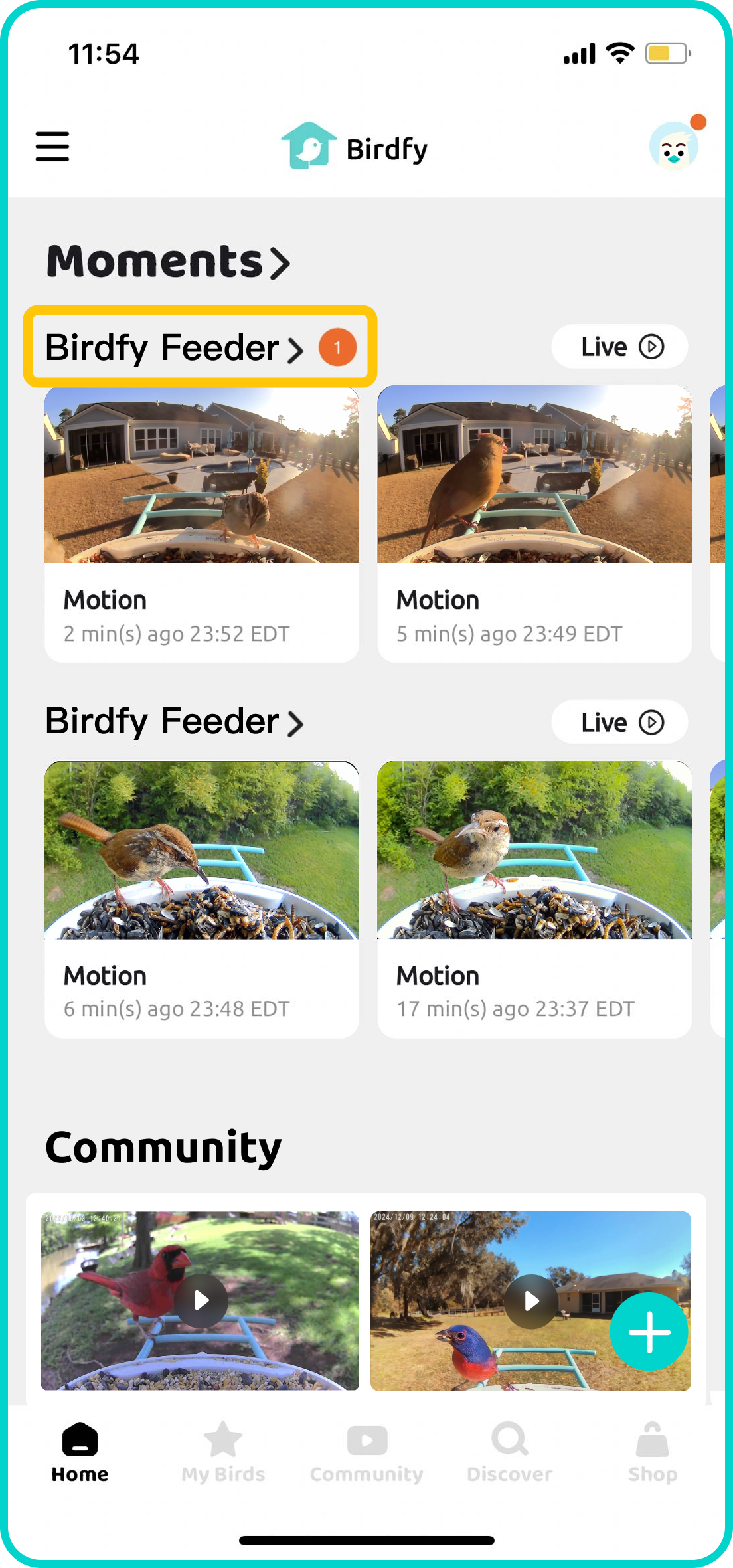
Once your Birdfy device is paired, simply wait for the first bird to visit! All detected activity will be shown in the Moments list on the Birdfy app's home screen.
To view a list of all recorded content, tap the name of your Birdfy device. If AI Bird Recognition is activated and a bird is successfully identified, a bird name tag will appear underneath the corresponding video.
Can more than one person connect to one Birdfy Feeder Metal 2 4K?
Yes. In the Birdfy app, you can share your feeder with an unlimited number of accounts. Simply follow the app's instructions: My Devices > Settings > How to Share. Shared guests will have access to the live feed and recorded clips. But they will not be able to alter any settings or delete your videos.
Does the Birdfy Feeder Metal 2 4K have cloud storage?
Absolutely! The Birdfy Feeder Metal 2 4K comes with unlimited cloud storage, with a 30-day retention period. Videos recorded over 30 days ago will be deleted. So be sure to download your favorites or save them permanently to your collection.
Does the Birdfy Feeder Metal 2 4K support MicroSD card storage or playback?
No. Birdfy Feeder Metal 2 4K does NOT support MicroSD card storage or playback.
What is the difference between "AI Lifetime Free" and "AI by Subscription"?
The Birdfy app offers a cloud service called AI Bird Recognition, which can identify bird species and generate fun daily highlight reports of your bird visitors.
If you purchase the AI Lifetime Free version, you're all set - no activation or extra payments needed. It's the best value out there, with everything included by default!
If you choose the AI by Subscription version, you'll get a 7-day free trial of the service. If you enjoy it, you can subscribe monthly, annually, or make a one-time payment to keep the magic going.